


Flickr
3.32.40K Reviews
App Specs
- Version
- 5.0.2
- Updated On
- License
- Free
- Downloads
- 1,000,000+
- Developer
- Flickr, Inc.
- Categories
- Photography
- Platform
- Android
Screenshots
 Analysis by AppCompare
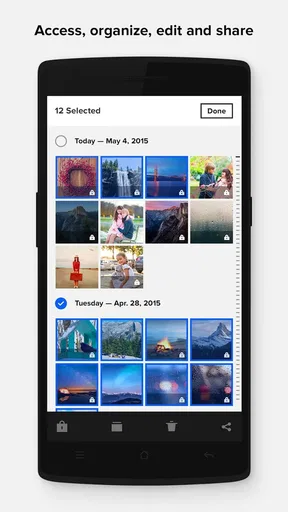
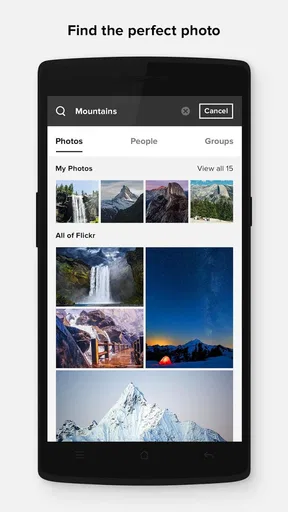
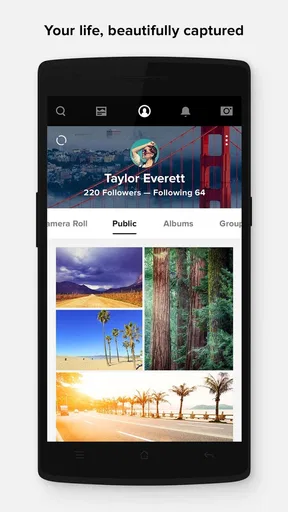
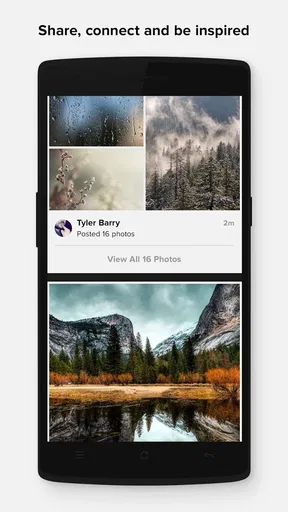
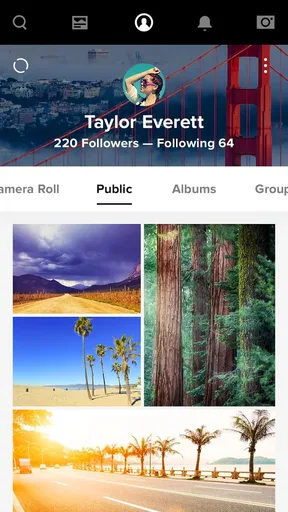
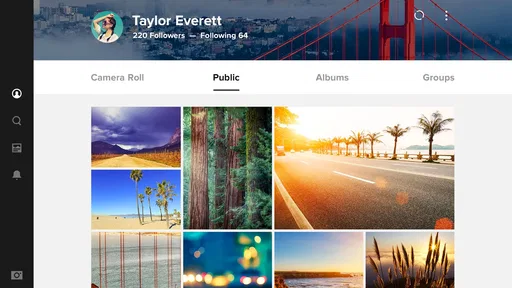
Flickr is the kind of photography app I appreciate more after using it as part of a routine rather than opening it only when I want to post a single picture. It gives me a place to upload, organize, edit, and share images from a phone, but its real value is in keeping a personal photo collection usable over time. That makes it different from a social feed built mainly around quick reactions.
The app is free to install, with optional purchases ranging from $9.99 to $82.00 per item. It comes from Flickr, Inc. and sits in the Photography category. The current release is version 5.0.2, and it runs on Android 7.0 or later. Its Mature 17+ rating is worth noticing before installing, especially on a shared family device.
My overall impression is positive but not uncritical. Flickr can be a strong home for people who think about albums, discovery, and long-term photo organization. It is less convincing if all you want is the quickest possible backup, a private camera roll, or a polished one-tap editor. The best results come from treating it as a photo library with a community attached, not simply as another place to publish snapshots.
How I built a dependable Flickr workflow
I build a dependable Flickr workflow by deciding what belongs in the collection before uploading, then keeping selection and organization consistent from one batch to the next. In this section, I focus on small checks that help prevent avoidable confusion and make it easier to recover when an upload or browsing session doesn’t go as planned.
Starting with one clear purpose
My first useful step was deciding what I wanted Flickr to do. If I treated it as a replacement for every other photo tool, the experience felt scattered. When I used it for a defined job—keeping selected images organized and making them easy to share—the app became much easier to understand.
A practical routine begins with choosing a small group of photos rather than sending everything into the same stream. For example, after a weekend walk, I might select the strongest landscape images, upload those, and leave ordinary test shots in the phone gallery. This keeps the Flickr collection intentional and makes later browsing less frustrating.
The app works particularly well for photographers who want their images to be seen in context. A set of related pictures can tell a better story than a sequence of unrelated uploads. I found that even simple themes, such as a neighborhood at different times of day or a short trip, made the collection feel more coherent without requiring elaborate editing.
Worth Reading Before You Choose

EA SPORTS FC Mobile 26 Is a Bigger Football Game, but It Takes Time

Flipboard Shows What News Apps Must Do Beyond the Feed

Switching to Android Auto Means Rethinking Your Driving Routine

Google Calendar Makes a Crowded Week Easier to Manage

Ludo King Makes the Most of the Minutes Between Plans

Baby Panda World Brings Quick Play to Modern Phones, but Its Game Library Feels Busy
Uploading without losing control
Uploading from a phone is convenient, but convenience can encourage careless habits. I recommend checking the selected images before confirming an upload. A quick review catches duplicates, accidental screenshots, and near-identical frames that add clutter without adding value.
I also prefer preparing the phone gallery first. I mark the images I actually want to keep, remove obvious mistakes, and then send that group to Flickr. This two-step process is slightly slower than uploading everything immediately, yet it saves time later because organization is easier when the collection starts clean.
For someone using the app while traveling, this approach has another benefit: it creates a lightweight publishing routine. I can select a few meaningful images at the end of the day, make modest adjustments, and share a compact set instead of flooding people with every frame. That is a better fit for Flickr than treating it like a live message thread.
Organizing photos so they remain findable
The difference between a useful photo library and a digital pile is organization. I found it helpful to use consistent album ideas rather than inventing a new structure every time. Albums based on a trip, project, event, or recurring subject are easier to revisit than vague collections with no clear boundary.
There is also a mental advantage to organizing while uploading. If I postpone every decision, the backlog becomes intimidating. I would rather place a new group into a sensible album immediately, even if the naming is simple, than promise myself I will sort hundreds of images later.
Experienced users should think of this as a repeatable habit: select, review, adjust, organize, then share. The order matters. Editing before deciding what belongs in the collection prevents wasted effort, while organizing before sharing reduces the chance that a public-facing set feels unfinished.
Sharing with a purpose
Flickr is more satisfying when sharing supports the image rather than distracting from it. I use it for work that benefits from being viewed as photography: a carefully framed street scene, a series of family travel pictures, or a personal project that deserves more attention than a disappearing social post.
That does not mean every upload needs to be formal. Casual images can still belong there, but I found the app less rewarding when I posted without considering why the picture mattered. A short, thoughtful collection usually feels stronger than a large stream of disconnected updates.
Editing: useful, but not a full replacement
The editing tools are handy for finishing an image before sharing, especially when I only need basic improvements. I see them as part of a publishing workflow rather than the main reason to use the app. If I need detailed retouching, layered work, advanced masking, or highly controlled color grading, I would prepare the image elsewhere and use Flickr for storing, presenting, and sharing the finished result.
This distinction saves disappointment. Flickr is convenient because the photo can move from phone to organized collection without jumping between many apps. However, convenience should not be confused with the depth of a dedicated editing suite. People who already have a preferred editor can still benefit from Flickr, while users seeking one comprehensive editing environment may prefer a specialized alternative.
Settings I check before settling in
I make a habit of reviewing the app’s available settings before building a large collection. The most important questions are practical: how uploads are handled, how much mobile data the workflow may use, and how sharing behavior fits my preferences. Even when the default setup is acceptable, checking it early prevents surprises during travel or on a limited connection.
I also pay attention to notification choices. A photography community can become noisy if every interaction demands attention. I prefer keeping alerts focused on activity I genuinely want to see, while using the app itself for browsing when I have time. This makes Flickr feel like a tool I control rather than another feed competing for attention.
Another useful check is image preparation. I decide whether a picture needs cropping, straightening, or a small tonal correction before upload. Doing this consistently gives a collection a more even appearance. It also avoids the common mistake of changing an image repeatedly because the original goal was never clear.
Small habits that make the app faster
One of my favorite improvements was batching related work. Instead of opening Flickr for one image at a time, I gather a group, review it in one sitting, and finish the associated album before moving on. Batching reduces the repeated mental effort of switching between selection, editing, and sharing.
I also keep a simple naming habit. Album names that include a recognizable subject and occasion are more useful than clever titles that I may not remember later. This is especially important when the collection grows and I need to locate a set quickly from the phone.
Another practical pattern is separating “archive” images from “showcase” images. Not every picture needs the same presentation. Some photos are valuable as records, while others deserve careful editing and sharing. Keeping those purposes distinct helps me avoid over-editing ordinary documentation or under-preparing images I want others to appreciate.
When I am working on a series, I review the images together instead of judging each one in isolation. A picture that seems weak alone may provide useful context beside the others, while a visually attractive frame may interrupt the sequence. Flickr becomes more effective when I think in sets rather than only in individual files.
What the app does better than familiar alternatives
Compared with a standard phone gallery, Flickr offers a more deliberate way to present photography. A gallery is excellent for quick access to everything on the device, but it can become crowded with downloads, screenshots, and temporary images. Flickr gives selected work a clearer destination and makes sharing feel more connected to the collection.
Compared with short-form social networks, Flickr feels better suited to photographs that deserve browsing rather than immediate consumption. The trade-off is that it may not deliver the same instant, broad interaction that users expect from a fast-moving social feed. If your priority is rapid exposure and constant conversation, another platform may feel livelier.
Compared with a dedicated cloud backup service, Flickr is more presentation-oriented. A backup tool is usually the better choice when the main requirement is quietly preserving every phone image with minimal involvement. Flickr makes more sense when I want to choose, arrange, and show photographs instead of merely storing them.
Compared with a professional editing application, Flickr is simpler and more convenient but less deep. I would not choose it as my only tool for demanding retouching. I would choose it as the place where finished or lightly edited photography becomes organized and shareable.
Where experienced use meets the app’s limits
The app’s flexibility does not remove the need for discipline. A poorly organized collection remains poorly organized even when it lives on a photography-focused service. Flickr rewards users who establish habits early, but it will not automatically make every upload meaningful.
There is also a difference between having a photo available and having a photo presented well. Uploading is only the middle of the process. Selection, grouping, editing, and context all influence how a viewer understands the work. Users who want a completely automatic experience may find this extra involvement unnecessary.
The average rating of 3.3 from around 34 thousand ratings suggests that the experience is not universally smooth for everyone. I would not treat that number as a complete verdict, but it does support a realistic expectation: Flickr is worth trying for its particular photography workflow, not because it is guaranteed to be the perfect app for every phone owner.
The service has passed one million installs, which gives it a substantial audience, yet popularity alone does not answer the most important question: does its library-and-community approach match your needs? For me, it does when I want a more considered home for selected images. For someone who only wants automatic camera-roll protection, it is probably more work than necessary.
Who should use it—and who should skip it
I would recommend Flickr to hobby photographers, travelers, visual storytellers, and anyone building a personal collection around subjects or projects. It is also a good fit for people who enjoy revisiting older images and improving how those images are grouped and shared.
I would be more cautious recommending it to someone who wants a private, invisible backup with no social dimension. I would also point heavy professional editors toward a dedicated editing workflow first. The app can sit beside those tools, but it does not need to replace them.
Parents should also consider the Mature 17+ content rating before handing the app to younger users. That rating is an important part of deciding whether it belongs on a family tablet or shared account.
My verdict after making it part of a routine
Flickr is at its best when I use it deliberately: curate first, organize consistently, edit with restraint, and share only what benefits from being seen. That approach reveals strengths that are easy to miss if the app is judged only as another upload button.
The free entry point makes it easy to test the workflow, while in-app purchases provide an optional path for users who decide the service deserves a larger role in their photography habits. I would begin without committing to extras, build a small, well-organized collection, and then decide whether the added value justifies spending.
My final recommendation is therefore specific. Choose Flickr if you want your photos to live in an organized, photography-centered space and you are willing to make a few decisions about selection and presentation. Skip it if your priority is purely automatic backup, advanced editing, or the fastest possible social reach.
For me, the app succeeds because it encourages a better relationship with a photo collection. It does not make every part of photography effortless, and that is precisely why the workflow can feel more intentional. Used with consistent settings, batching, and album habits, Flickr becomes a practical long-term home for photographs rather than just another place to send them.
Pros
- Excellent photo discovery through communities and themed groups.
- Strong privacy controls for public
- private
- and shared photos.
- Displays useful metadata
- including camera and shooting details.
- Supports high-resolution uploads for preserving image quality.
- Web and mobile versions stay well synchronized.
Cons
- Free accounts have limited storage and upload restrictions.
- The interface can feel cluttered for first-time users.
- Some advanced organization tools require a paid plan.
- Search results may include repetitive or low-quality images.
- Offline access to uploaded photos is limited.
FAQs for Flickr
What is Flickr, and what can I use it for?
Flickr is an online photo and video hosting platform designed for storing, organizing, sharing, and discovering visual content. After installing the app, you can upload images from your device, create albums, follow photographers, join interest-based groups, and explore a large community gallery. It is useful for casual photographers, hobbyists, professionals, and anyone who wants a more photography-focused alternative to general social networks.
Is Flickr free to download and use?
The Flickr app can generally be downloaded for free on supported Android and iOS devices, and users can create an account without paying. However, the free experience may include limits on storage, uploads, or certain account features, depending on Flickr’s current plans. Paid memberships are available for users who need additional storage, advanced tools, fewer restrictions, or other premium benefits, so checking the latest pricing is recommended.
Does Flickr automatically make my photos public?
No, Flickr provides privacy settings that let you control who can view each uploaded photo or video. Depending on your preference, content can be public, visible only to people you designate, or kept private. During testing, it was important to review the audience setting before publishing because public photos may appear in searches, groups, and other users’ discovery feeds.
Can I edit photos inside the Flickr app?
Flickr is primarily focused on hosting, organizing, and sharing photos rather than replacing a full professional editing application. You can manage uploads, add titles and descriptions, apply tags, organize images into albums, and adjust sharing settings, but advanced editing tools may be limited compared with dedicated apps such as Lightroom or Snapseed. It is best to edit images elsewhere when detailed adjustments are required.
What should I know about uploading photos and using mobile data?
Uploading large photos or videos can consume considerable mobile data and may take time when the connection is slow. For the smoothest experience, use a reliable Wi-Fi network and keep the app updated. You should also check the app’s upload and backup preferences, confirm that it has permission to access your photo library, and make sure your Flickr account has enough available storage for the files you want to keep.


